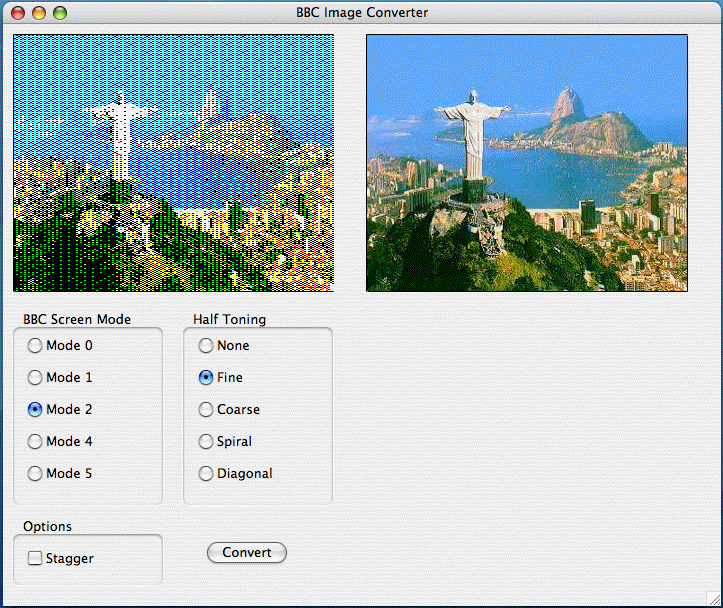
Select your image file from the File -> Open menu option. The image will be loaded, auto scaled to 320 x 256 and shown in the window on the right hand side of the screen.
After a few seconds, the initial preview image will appear in the left hand window.
You can then select the options to choose which BBC screen mode and dithering options to use.
Press the 'Convert' button to refresh the preview image and create the screen dump file on disc.
The screen dump will be stored in a file called $.screen in the same directory as the application program. A .inf file is also generated which is needed if you are going to create a disc image using something like DFS Explorer.
Once you have your screen dump on your Beeb, you can look at it by using command similar to the following :
- MODE 2 (or whatever mode the image was created for)
- *LOAD SCREEN
Future versions may include the ability to auto-create disc images, optimise the palette on the BBC for better colour matching, slide show functionality plus any more you may want adding.
You can see a screen shot of the program running below.
If the program crashes with strange errors etc, please let me know so I can fix the problems !
Also, if you are good at creating program icons and would like to design an icon for this program, please get in touch as I am really pants when it comes to anything artistic !
You can download the latest version of the program below :
- Mac BBC Image Converter 1.0.0 31/12/06 (2681 KB)
The program is written using REALbasic 2006 R4 and so is a true universal binary application.
| Revision History | ||
|---|---|---|
| Date | Version | Changes |
| 31/12/06 | 1.0.0 | Initial Release |
| Date | Downloads |
|---|---|
| Jan 2007 | 6 |
| Dec 2006 | 4 |
| Total | 10 |